

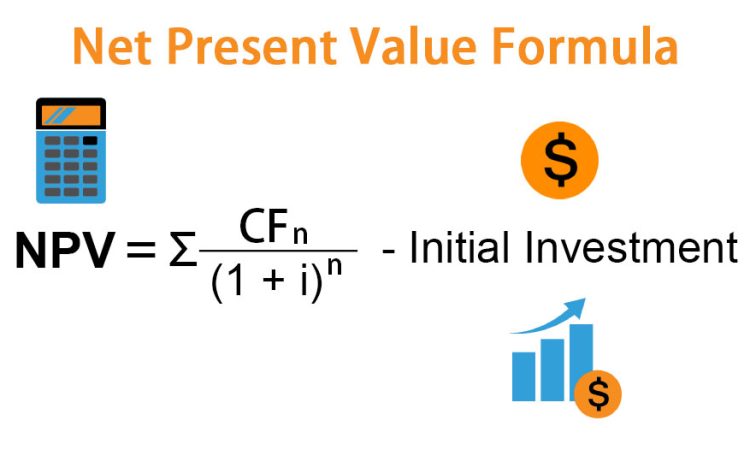
The net present value formula calculates the difference between the present value of cash inflows and the present value of cash outflows over a period of time. It tells you—in today’s dollars—whether an investment is worth making. The formula is expressed as
, where a positive result suggests the project will add value to the firm.
The Formula:
> NPV = Σ [CFₜ / (1 + r)ᵗ] − Initial Investment
Where:
- CFₜ = Cash flow in period t
- r = Discount rate (your required rate of return or cost of capital)
- t = Time period (1, 2, 3… years)
- Σ = Sum of all discounted cash flows
Why We Discount Cash Flows
Money today is worth more than money tomorrow – because today’s dollar can be invested to earn a return. The discount rate reflects this opportunity cost.
If you expect a 10% return on your investments, then $110 received one year from now is only worth $100 today ($110 / 1.10 = $100). NPV applies this logic to every cash flow in a project.
Step-by-Step NPV Calculation
Example: You’re evaluating a project requiring a $100,000 investment today. It will generate $30,000 per year for 4 years. Your discount rate (cost of capital) is 8%.
Step 1: Calculate the present value of each year’s cash flow:
| Year | Cash Flow | Discount Factor (8%) | Present Value |
|---|---|---|---|
| 1 | $30,000 | 1/(1.08)¹ = 0.926 | $27,778 |
| 2 | $30,000 | 1/(1.08)² = 0.857 | $25,720 |
| 3 | $30,000 | 1/(1.08)³ = 0.794 | $23,815 |
| 4 | $30,000 | 1/(1.08)⁴ = 0.735 | $22,050 |
| Total PV | $99,363 |
Step 2: Subtract the initial investment:
> NPV = $99,363 − $100,000 = −$637
Decision: The NPV is slightly negative – meaning the project returns slightly less than the 8% required rate. At this hurdle rate, it’s marginally not worth pursuing.
The NPV Decision Rule

| NPV Result | Decision |
|---|---|
| Positive (> 0) | Accept – the investment creates value above the required return |
| Zero (= 0) | Neutral – exactly meets the required return; other factors decide |
| Negative (< 0) | Reject – the investment destroys value relative to the required return |
When choosing between multiple projects, select the one with the highest positive NPV – it creates the most value.
Calculating NPV in Excel
Excel makes this straightforward:
=NPV(rate, value1, value2, …) + Initial Investment
Important: Excel’s NPV function discounts from period 1 onward, so you add the initial investment (as a negative number) separately:
=NPV(0.08, 30000, 30000, 30000, 30000) + (-100000)
NPV vs IRR: When to Use Each
| Situation | Better Metric | Why |
|---|---|---|
| Single investment decision | NPV | Shows dollar value created |
| Comparing multiple projects of different sizes | NPV | Accounts for scale |
| Communicating return as a percentage | IRR | Easier to compare to hurdle rate |
| Non-conventional cash flows | NPV | IRR can give multiple solutions |
Most corporate finance textbooks recommend NPV as the primary decision tool – but both metrics together give the clearest picture.
The Bottom Line
The net present value formula translates all future cash flows into today’s dollars, then compares that total to what you’re spending today. A positive NPV means the investment is worth more than it costs; a negative NPV means the opposite. It’s the most theoretically sound capital budgeting tool available – and one of the most important calculations in business finance.